Geocomp Systems
Home
Thin Black line
current page marker
Products
News
Support
Training
Contact
Free Software
Purchase
FAQ
Links
Home

Trimble Terramodel Visualizer

Visualizer is an interactive project-visualization tool that displays Terramodel files as 3D models.

    Visualizer Base

  • Display togographically-accurate terrains, maps and 3D scenes built using Trimble Terramodel.
  • Move from point to point, rotate the scene, add lighting, and place design elements in the surrounding area.
  • Render data to create realistic walk or fly-throughs.
  • Create and record flight paths through the project and produce .AVI movies of recorded flight paths.
  • Create finished presentations of existing and proposed design to improve communication with clients and to minimise potential problems.
  • Create Custom Surface, Wireframe, Background and Point Colours.
  • Display textures and lines on multiple surfaces
  • Add 3D representations of landscaping features such as trees, signs and buildings.
  • Control shaded-surface display modes.
  • Render multi-sided linear objects such as pipes, beams and columns.
  • Import and export ASCII, DXF, DWG, DGN and other industry-standard formats.
  • Capture and print high-resolution images in popular formats like TIFF.

    Visualizer Complete

  • Everything in Visualizer Base
  • Edit the terrain model model entirely within the 3D Visualizer
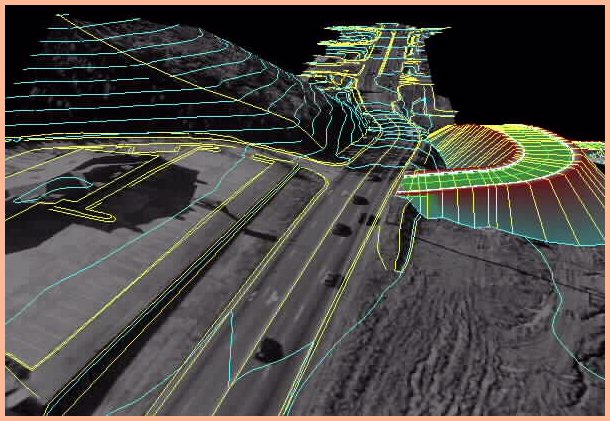
  • Drape orthophoto images
  • View the project in stereo (with extra hardware).

Trimble Terramodel Visualizer was also known as TerraVista in some countries.

Please contact Jerry Cresp at Geocomp Systems for any questions you may have about Trimble Terramodel Visualizer, or see our contact details page.

Trimble Terramodel Field data module includes 3D Visualizer command which displays one surface. Terramodel Visualizer image with draped orthophoto

An image generated in Trimble Terramodel Visualiser with the draped orthophoto module.

brown bar